Searching documents
Advanced filtering and sorting is possible in ProFID, which enables to find back a document of interest or get some statistics about the documents and series which populate the database.
It provides answers to questions such as:
- How many Italian documents my service has introduced until now?
- How many driving licenses from Eritrea have been registered?
- How many documents are part of the XYZ series and by who have they been seized?
Filtering documents
Hover the "Documents" menu and then go to "Documents list". Click on the button show below by the red arrow.
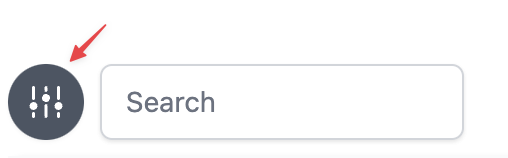
This will open the faceted search sidebar. With faceted search, you can narrow down your search results by selecting different categories or "facets" that are important to you. Many of the document's properties are available as facets.
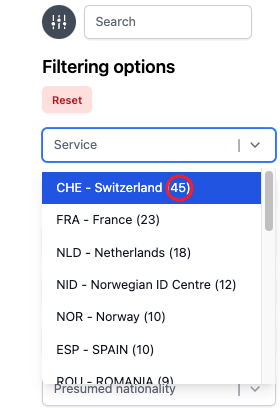
The numbers in parentheses when selecting criteria indicate the number of documents that match it. They adapt dynamically. The list of displayed documents change dynamically based on the selected criteria.
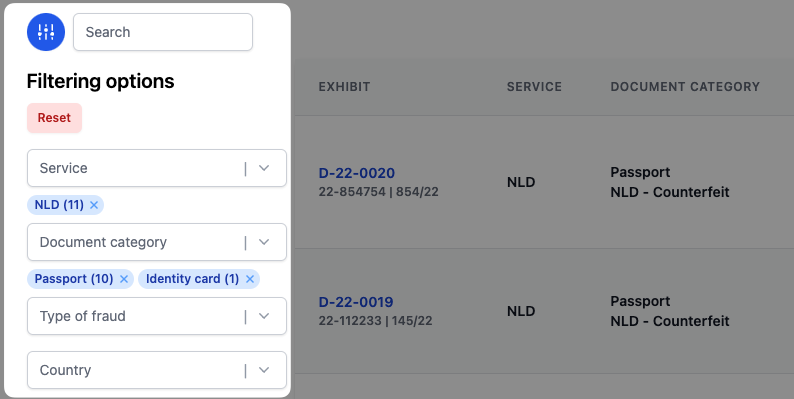
For example in the image below, some criteria were selected which match 11 documents. All of them are from Netherlands. 10 documents are passports and 1 is an identity card.
The red "Reset" button removes all filters.
When searching for a series, if your query matches the series' alias, it is also be displayed.

Sorting documents
You can also sort the filtered document list by date of document's creation or by the date that the document was seized on. In order to do so click on the button next to the title of the column, as indicated by the red arrows below.

Example of sorting by date of document seizure.
Different icons are used depending on current sort order.
| Test | Test |
|---|---|
 | Not sorted |
 | Ascending order |
 | Descending order |
Sort icons.